


Bluesky is growing fast, but one major challenge remains for brands: the platform lacks native scheduling. Manually publishing updates makes it difficult to maintain consistency, plan campaigns and ensure a strong presence across all time zones.
To unlock the full potential of your Bluesky strategy, you need a social media management solution that supports planning, approvals and performance analysis. This guide shows you how to schedule Bluesky posts using Sprout Social, helping you stay active, get real ROI and move beyond manual publishing.
Why schedule Bluesky posts?
Bluesky moves quickly and rewards brands that participate consistently. Scheduling empowers you to:
- Maintain a reliable posting cadence.
- Free up time to focus on replies, conversations and customer care.
- Plan campaigns and unify cross-network messaging.
- Streamline your publishing workflow across teams and channels.
When you schedule posts, you make it easier to be active during key engagement windows, not just when you happen to be online.
How to schedule Bluesky posts with Sprout Social
Since Bluesky lacks native scheduling, Sprout Social provides the essential tools for consistency and workflow control. Sprout allows you to draft, schedule, approve and manage Bluesky content alongside every other network within one unified workflow.
Below is a clear, step-by-step guide to scheduling your first Bluesky post in Sprout.
Step 1. Connect your Bluesky profile
Connecting your Bluesky account works just like connecting any other network in Sprout. Here’s how:
- Set up a Sprout account with a 30-day free trial
- Go to Account and settings
- Select Connect a profile (or use + Connect a profile from Groups & Social Profiles)
- Choose the correct Group
- Click Connect under Bluesky
- Enter your Bluesky handle and select Go to Bluesky
- Follow the authorization prompts

Once you connect the account, your Bluesky profile instantly becomes available in Compose, the publishing calendar and Post Performance.
Step 2. Open Compose and draft your post
Compose is your central hub for all content creation in Sprout. You can draft Bluesky content the same way you write for LinkedIn, Instagram, X or Threads, all from one place.
In Compose, select your Bluesky profile from the Profile Picker, then draft your text. Along with written content of up to 300 characters, you can include emojis, links and line breaks.
Compose also allows teams to collaborate, store reusable copy in the Asset Library and maintain consistent messaging across channels.

Step 3. Add your media and links
You can publish the following types of posts to Bluesky using Sprout:
- Text-only posts
- A link preview
- Up to four images
- One video (up to three minutes)
You can also add alt text to each image directly in Compose to make your content more accessible, a best practice Bluesky actively encourages.
Additional media specifics for Bluesky
To help your team plan content properly, here are key technical requirements:
- Image size: Up to 2000 pixels (automatically compressed to Bluesky’s storage standard of ~1000 pixels on the longest side)
- Aspect ratio: Very flexible, generally from 0.01:1 to 10:1
- Video formats: .mp4, .mov, .webm, .mpeg
- Video limits: Up to 3 minutes, 25 videos or 10GB per day
- Link attachments: Link previews automatically generate title, image and description when available
This gives your content team confidence that Sprout supports everything Bluesky currently offers.
Step 4. Choose your scheduling options
Once your content is ready, choose how you want to publish it.
In Sprout, you can publish Bluesky posts in the following ways:
- Select a specific date and time
- Add it to a Queue for automated publishing
- Use Optimal Send Times to publish at your audience’s peak engagement windows
Sprout analyzes your historical performance and audience behavior to recommend the best times to post with the highest predicted engagement.
Step 5. View and manage your post in the publishing calendar
After scheduling, your Bluesky post appears inside Sprout’s unified content calendar. This gives teams complete visibility across all connected social media networks. From the calendar, you can edit scheduled posts, reschedule with drag-and-drop and filter by profile, campaign or tag.
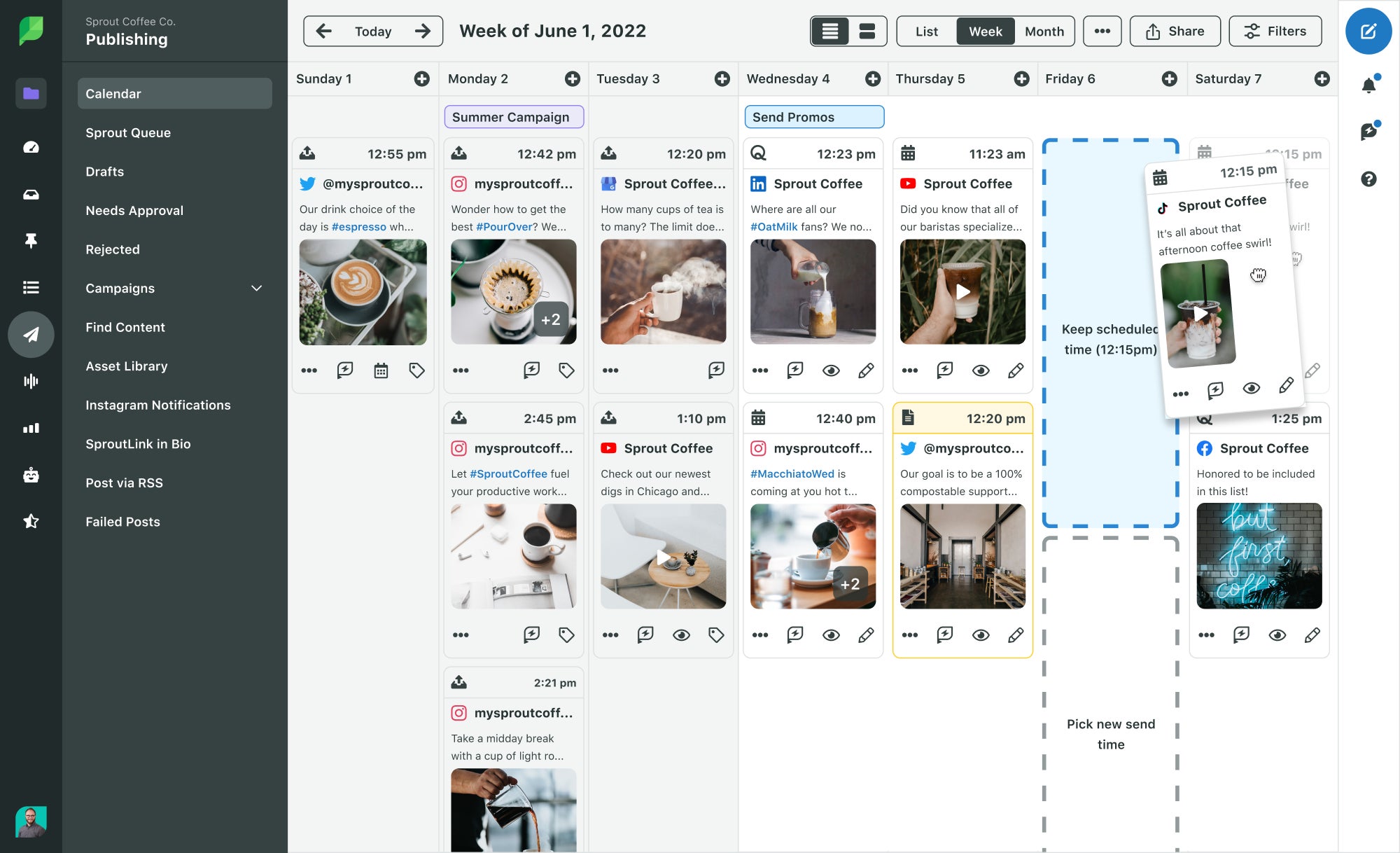
Along with these features, you can also share calendar views with stakeholders and align your messaging across channels.
3 core benefits of scheduling your Bluesky content
Scheduling is more than convenience. It’s a strategy. It frees capacity, reduces risk and creates more space for high-value work that drives brand growth and community engagement.
Here are the core business reasons to schedule your Bluesky content.
1. Free up your time for real-time engagement
Bluesky is a conversation-driven network. Visibility is earned through participation, not broadcasting. Replies, quotes and spontaneous interactions often outperform standalone posts. This is because they signal that your brand is genuinely present in the community. When posting manually, teams burn time on routine publishing tasks instead of showing up in conversations. Scheduling shifts that effort from clicking ‘post’ to actually participating in threads, replies and quotes.
Automating your outbound content lets your team allocate more energy to replying to threads, resharing user insights, joining niche community discussions and contributing to active conversations that matter to your audience.
For example, this post by the University of Utah beautifully shares a sporting event. A user responded, asking for more content like this, a sign of high Bluesky demand for that content and engagement.

Source: Bluesky
These interactions build trust and help you form deeper relationships where Bluesky users gather. Scheduling doesn’t replace authenticity. It creates the bandwidth for it.
2. Build a consistent and timely brand presence
Bluesky moves quickly and rewards brands that participate consistently. A steady posting cadence helps you show up across time zones and in more curated feeds, which strengthens your credibility. When your content appears predictably, users begin to see your brand as a reliable contributor, and that reliability translates into more replies, quotes and reposts over time.
3. Streamline your content approval workflows
For many teams, manually posting to Bluesky introduces operational risk. Without a structured workflow, brands face delays, inconsistent messaging, compliance issues, missing approvals and a lack of version control when multiple contributors are involved. These challenges increase the likelihood of publishing errors or off-brand content slipping through.
Sprout eliminates these friction points by centralizing the entire approval process. Teams can collaborate on drafts, route content through multi-step or single-step approvals, maintain complete edit histories and enforce a consistent brand voice across all posts.
Role-based permissions prevent unauthorized edits, while shared calendars give stakeholders visibility into upcoming content. This structure is especially valuable for regulated industries, global organizations, multi-team environments and agency-client relationships where oversight and precision are essential.
By streamlining the workflow, Sprout reduces publishing risks and ensures every Bluesky post meets the required strategic, legal and brand standards.
Go beyond publishing: Get a strategic Bluesky advantage with Sprout Social
Scheduling is only the start of an effective Bluesky strategy. Sprout Social takes you beyond basic publishing, turning Bluesky into a structured, data-driven program. Instead of treating it as another channel, Sprout gives you the insight and workflows to understand what resonates and why.
Optimal Send Times is one of Sprout’s most useful capabilities. It analyzes your historical performance to identify when your audience is most likely to engage. Instead of guessing, you schedule posts during the windows with the highest predicted visibility based on replies, quotes and repost patterns.
Sprout also provides Bluesky analytics so you can track content performance. Measure replies, reposts, likes, quotes and combined share activity.
Post Performance shows how each post compares and which formats spark conversation. For deeper analysis, Premium Analytics (a paid add-on) offers customizable widgets and visual dashboards to help you adjust your approach.
Sprout centralizes your entire Bluesky workflow—publishing, approvals, planning and analytics all live in a shared workspace, which improves consistency and reduces manual steps. Built-in AI support streamlines ideation and helps refine copy while keeping your brand voice intact.
With this unified approach, Bluesky becomes part of a larger social ecosystem rather than a standalone task. Teams operate with more clarity, work faster and build a scalable presence across every network they manage.
The 3 top Bluesky scheduling platforms
Here’s a quick breakdown of three platforms that currently support Bluesky scheduling:
1. Sprout Social
Sprout Social offers the most comprehensive scheduling and strategic experience available for Bluesky today. Teams can draft content in Compose, attach media, add alt text and schedule posts for precise times or using Optimal Send Times. In Sprout’s unified publishing calendar, Bluesky posts appear alongside content from every other network, giving your team full visibility and better cross-channel alignment.
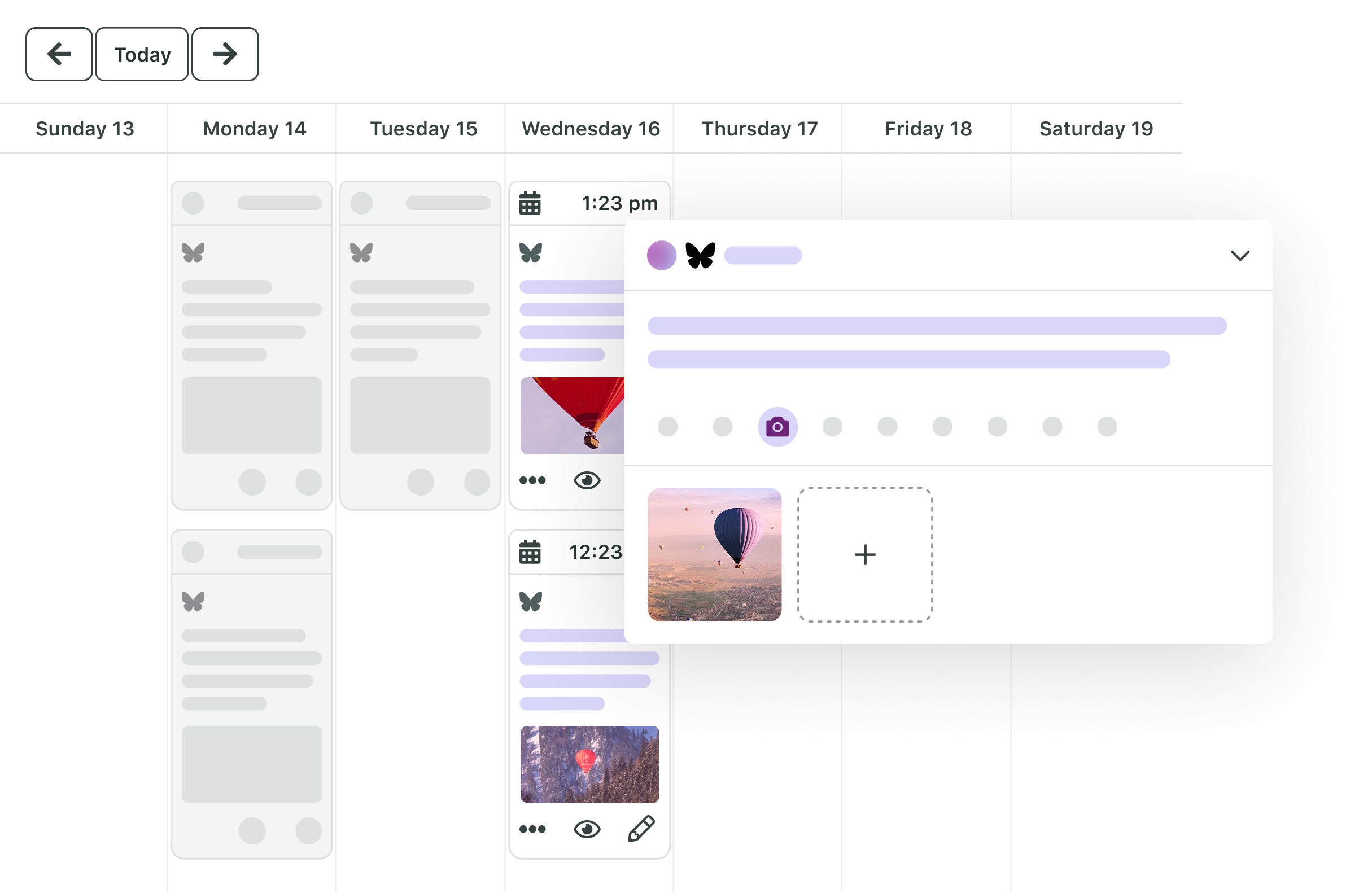
Beyond scheduling, Sprout includes deep analytics for Bluesky through the Post Performance report and customizable Premium Analytics dashboards. These insights highlight trends in replies, quotes, reposts and likes so you can understand exactly which topics or formats resonate most with your communities.
With integrated approval workflows, campaign tagging, asset management, AI-powered content creation and engagement tools, Sprout brings your entire Bluesky strategy—publishing, planning, reporting and collaboration—into a single cohesive ecosystem.
Curious to see Bluesky social media management in action with Sprout Social?
Schedule a demo
2. Buffer
Buffer is an approved Bluesky partner and one of the earliest tools to support the platform’s publishing API. Its scheduling functionality is straightforward: you can draft Bluesky posts, attach images and queue them for automated publication. Buffer also supports basic cross-posting, making it easy for smaller teams or individual creators to adapt a post for Bluesky while sharing variants across other channels.
Source: Buffer
The tool’s lightweight design and minimal learning curve make it a good fit for users who primarily need a simple, reliable scheduling tool without advanced analytics or approval workflows. While its Bluesky integration currently focuses on core posting features rather than deeper reporting or engagement capabilities, Buffer remains a practical solution for creators and teams that value simplicity and speed.
3. SocialPilot
SocialPilot also offers scheduling support for Bluesky Social, giving marketers the ability to draft posts, attach media and organize their content within a familiar content calendar. Its interface makes it easy to view upcoming Bluesky posts alongside other connected social accounts, helping teams maintain consistency across channels.

Source: SocialPilot
The platform is for marketers who want a straightforward social media scheduling solution without additional layers of analytics or collaboration complexity. It offers a dependable way to plan Bluesky content in advance, manage posting times and automate basic publishing workflows.
3 best practices for scheduling Bluesky posts to drive growth
Scheduling is only one part of building a strong Bluesky presence. To grow meaningfully on the network, brands need a strategy rooted in community engagement, data-backed decision-making and authentic communication.
These best practices turn a simple posting workflow into a repeatable engine for visibility, trust and long-term growth.
1. Use scheduling to build community
Scheduling provides the stability your brand needs to stay visible, but its real value is how it helps you consistently show up in the threads, quotes and custom feeds where Bluesky users actually spend their time. When publishing is automated, your team can invest more energy in the types of interactions Bluesky rewards: answering questions, contributing to niche discussions, amplifying user insights and joining active conversations as they unfold.
These behaviors signal that your brand is not just posting content but actively contributing to the community. Over time, this creates deeper loyalty and higher engagement. This is especially true when you pair it with Optimal Send Times to ensure your scheduled content appears during peak interaction windows.
2. Build a data-driven content engine, not just a schedule
While scheduling creates consistency, data reveals what actually works. Bluesky reporting in Sprout helps you identify the topics, formats and posting patterns that spark conversations and drive measurable engagement.
By analyzing replies, reposts, likes and quotes, you can pinpoint which themes inspire meaningful interactions, which visual formats attract attention and which posting windows lead to faster engagement.
Over time, this allows your team to recognize evergreen content that continues to resurface in custom feeds or quote threads—an important behavior unique to Bluesky’s decentralized ecosystem.
When publishing, listening, analytics and iteration work together, you build a content engine that continually improves. This leads to more efficient creation cycles, stronger performance trends and a clear connection between your Bluesky activity and measurable ROI.
3. Prioritize authenticity, not just automation
Even with the best scheduling strategy, growth on Bluesky depends on how human your brand feels. The network places a high value on transparency, originality and conversational tone. Users expect brands to interact like real people, not like corporate entities.
Scheduling helps you maintain cadence, but your voice is what determines how your content resonates. Write posts that feel personal, curious or insightful. Ask questions. Share perspectives that reflect your brand’s personality. Comment on ongoing discussions. Use quotes to add value rather than simply promote.
These behaviors build trust and make your content more memorable, especially on a network where users gravitate toward creators and brands that feel genuine. Automation helps you show up consistently, but authenticity is what makes people care enough to respond, reshare and return to your page.
How scheduling supports enterprise workflows on Bluesky
For larger organizations, managing Bluesky effectively requires more than simply publishing content on time. Enterprise teams often operate within complex workflows that include multi-step approvals, legal or compliance reviews, regional content variations and strict visibility requirements around content ownership.
Multi-step approval workflows ensure the right stakeholders review content before it goes live. Campaign tags and shared calendars give teams a unified view of how Bluesky content fits into broader initiatives. Profile- and role-based permissions prevent unauthorized edits.
In this environment, scheduling becomes the foundation for compliance and consistency. This enables large organizations to maintain quality, control and clarity at scale, while still showing up authentically on a fast-evolving, conversation-driven network.
Unify your Bluesky workflow in one powerful platform
Sprout Social isn’t just a Bluesky scheduler. It’s a complete social media management platform that helps you plan, schedule, publish, engage and report across every channel. With tools for approvals, AI-powered creation, analytics and collaboration, you can run your entire Bluesky strategy with confidence and clarity.
Ready to move from manual posting to a unified social strategy? Start your free Sprout Social trial today.